Google OAuth Token Expiration: Causes and Solutions
CK 3828 Created at
19200
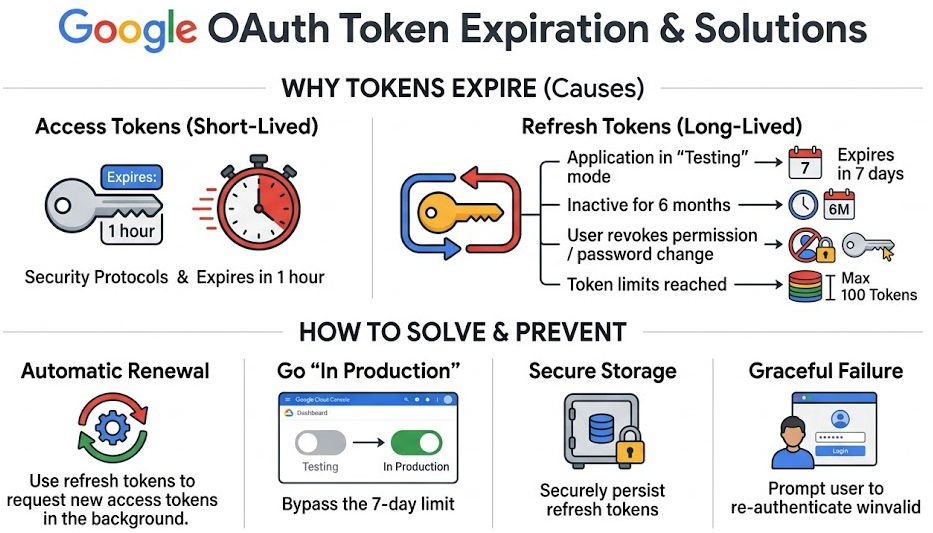
When using the Google OAuth Platform, access tokens expire primarily because of built-in security protocols that limit their lifespan to one hour, whereas refresh tokens may expire if the application is in "Testing" mode (limiting validity to seven days), if it remains unused for six months, if the user revokes permission or changes their password, or if token issuance limits are reached. To address these expiration issues, developers should implement a token management system that uses refresh tokens to automatically request new access tokens in the background, transition the OAuth consent screen status from "Testing" to "In production" within the Google Cloud Console to bypass the seven-day restriction, securely persist refresh tokens, and handle exception cases gracefully by prompting the user to re-authenticate when a refresh token is invalidated.
1. Types of Tokens in Google OAuth
To understand expiration, it is essential to distinguish between the two primary tokens used in the Google OAuth 2.0 framework:
Access Token: A short-lived token sent in HTTP headers to authorize requests to Google APIs.
Refresh Token: A long-lived token used to obtain a new Access Token when the current one expires, without requiring user interaction.
2. Reasons Why Tokens Expire
A. Access Token Expiration (By Design)
Time Limit (1 Hour): Google Access Tokens automatically expire 60 minutes (3,600 seconds) after issuance. This is a deliberate security measure to minimize damage if a token is intercepted.
B. Refresh Token Expiration and Invalidation
Unlike Access Tokens, Refresh Tokens are designed to last longer, but they can be invalidated or expired due to specific conditions:
Testing Publishing Status (7-Day Limit):
If the app's OAuth Consent Screen status in the Google Cloud Console is set to "Testing", the Refresh Token expires after 7 days (168 hours).
Inactivity (6-Month Limit):
If a Refresh Token is not used to fetch a new Access Token for 6 consecutive months (186 days), it will permanently expire.
Token Quantity Limit per User/Client Pair:
Google enforces a limit of 100 Refresh Tokens per Google account per OAuth 2.0 client ID. If this limit is exceeded, creating a new Refresh Token automatically invalidates the oldest one without warning.
User Interventions:
Password Reset: Changing the Google account password invalidates existing Refresh Tokens for security.
Google detects suspicious activity or potential token leakage and forcibly revokes the token.
3. How to Resolve and Prevent Expiration Issues
A. Automatic Access Token Renewal
To ensure uninterrupted service, applications should automatically request a new Access Token using the stored Refresh Token before or immediately after the Access Token expires.
Implementation Strategy:
Check the expiration timestamp (expires_in) of the Access Token before making API calls.
If expired, send an HTTP POST request to https://oauth2.googleapis.com/token with the refresh_token, client_id, and client_secret.
Use the newly returned Access Token for subsequent requests.
B. Transition App Status from "Testing" to "In Production"
To bypass the 7-day Refresh Token expiration limit during development:
Go to the Google Cloud Console > APIs & Services > OAuth consent screen.
Change the Publishing Status from Testing to In Production.
Note: Depending on the requested scopes (sensitive or restricted), your app may need to undergo a Google Verification process.
C. Ensure Offline Access During Initial Authorization
To obtain a Refresh Token, the authorization request must explicitly ask for offline access and user consent.
Set the following query parameters during the authorization flow:
access_type=offline: Requests a Refresh Token alongside the Access Token.
prompt=consent: Forces the consent screen to show, ensuring a new Refresh Token is returned (Google usually issues a Refresh Token only on the first authorization unless forced).
D. Handle Expiration Errors Gracefully (Graceful Degradation)
When a Refresh Token becomes invalid, API calls will return an HTTP 401 Unauthorized or an error payload containing invalid_grant.
Action Required:
Catch the invalid_grant error in your application logic.
Clear the stored invalid Refresh Token from your database.
Redirect the user back to the login/authorization page to re-authenticate and consent to a new Refresh Token.
E. Optimize Refresh Token Storage
Store Refresh Tokens securely in an encrypted database.
Avoid issuing multiple Refresh Tokens for the same user unnecessarily to prevent hitting the 100-token limit per client. Reuse existing valid Refresh Tokens whenever possible.