Why SPF and DKIM Are Essential for Linux Email Servers?

CK CK 3828 
Created at  
138 0 0

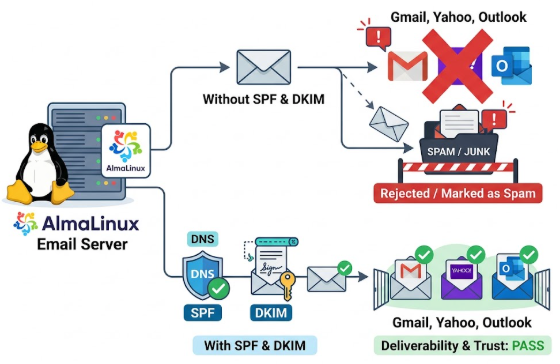
When running an email server on a Linux platform such as AlmaLinux, outgoing messages sent without domain authentication mechanisms are highly likely to be marked as spam or rejected outright by major email providers (such as Gmail, Yahoo, and Outlook). SPF and DKIM solve these authentication and trust problems.

Why SPF and DKIM Are Essential for Linux Email Servers?

Understanding the Core Concepts

1. Sender Policy Framework (SPF)

  • What it is: SPF is an email authentication method designed to detect spoofing and forged sender addresses during email delivery.
  • How it works: The domain owner publishes a list of IP addresses or subnets in a public DNS TXT record that are authorized to send email on behalf of that domain.
  • Why it is needed:
    • Prevents IP Spoofing: Restricts attackers from using your domain name to send unauthorized spam or phishing emails from arbitrary servers.
    • Improves Inbox Placement: Receiving mail servers check the sending IP against your SPF DNS record. If matched, the email passes initial sender verification.


2. DomainKeys Identified Mail (DKIM)

  • What it is: DKIM is a cryptographic authentication protocol that attaches a digital signature to every outgoing email message.
  • How it works:
    1. The local Mail Transfer Agent (MTA) uses a private key stored on the Linux server to sign outgoing email headers and body content.
    2. The receiving mail server fetches the matching public key published in the sender's DNS records to verify the signature.
  • Why it is needed:
    • Ensures Message Integrity: Guarantees that the email content was not tampered with in transit between the sender and receiver.
    • Verifies Identity: Confirms that the domain owner actually authorized the email, building long-term domain reputation.


Key Benefits of Implementing SPF & DKIM

  1. Strict Deliverability Requirements (2024+ Rules): Major email providers mandate valid SPF, DKIM, and DMARC setups for high-volume senders. Unauthenticated mail is frequently bounced.
  2. Protection Against Brand Abuse: Reduces the chance of your domain being blacklisted due to third-party spoofing or spam campaigns.
  3. Foundation for DMARC: DMARC (Domain-based Message Authentication, Reporting, and Conformance) relies directly on the alignment and success of both SPF and DKIM checks.


Step-by-Step Guide: Setting Up SPF and DKIM on AlmaLinux 10

This guide assumes you are running AlmaLinux 10 with Postfix installed and running as your primary Mail Transfer Agent (MTA).
 

Prerequisites

  • An AlmaLinux 10 server with root or sudo privileges.
  • A fully qualified domain name (e.g., example.com).
  • Access to your domain's DNS management panel.
  • A valid Reverse DNS (PTR) record configured for your server's public IP address.


Phase 1: Configuring the SPF Record

SPF configuration is entirely DNS-based and does not require software installation on the server.

  1. Log in to your DNS provider's control panel.
  2. Create a new TXT record with the following parameters:
FieldValue
TypeTXT
Name / Host@ (or leave empty depending on DNS provider)
Valuev=spf1 ip4:YOUR_SERVER_IP ~all
TTL3600 (or default)

Replace YOUR_SERVER_IP with your server's actual static public IPv4 address.


Phase 2: Installing and Configuring OpenDKIM on AlmaLinux 10

Step 1: Install OpenDKIM and EPEL Repository

On AlmaLinux 10, OpenDKIM packages are provided via the EPEL (Extra Packages for Enterprise Linux) repository.

# Enable the EPEL repository
sudo dnf install -y epel-release

# Refresh repository cache
sudo dnf makecache

# Install OpenDKIM and its tools
sudo dnf install -y opendkim opendkim-tools


Step 2: Generate DKIM Key Pair

  1. Create a directory structure to hold the keys for your domain:
sudo mkdir -p /etc/opendkim/keys/example.com
  1. Generate the key pair using opendkim-genkey:
sudo opendkim-genkey -b 2048 -d example.com -s default -D /etc/opendkim/keys/example.com/
  • Parameters explained:
    • -b 2048: Specifies key size (2048-bit is standard).
    • -d example.com: Specifies your domain name.
    • -s default: Specifies the selector name (e.g., default._domainkey.example.com).
    • -D: Specifies the target directory.
  1. Fix file ownership permissions:
sudo chown -R opendkim:opendkim /etc/opendkim/keys/example.com
sudo chmod 700 /etc/opendkim/keys/example.com


Step 3: Configure OpenDKIM

  1. Open the main OpenDKIM configuration file:
sudo nano /etc/opendkim.conf
  1. Update or verify the following configuration directives:
AutoRestart          Yes
AutoRestartRate      10/1h
UMask                002
Syslog               Yes
SyslogSuccess        Yes
LogWhy               Yes

Mode                 sv
Canonicalization     relaxed/simple

ExternalIgnoreList   refile:/etc/opendkim/TrustedHosts
InternalHosts        refile:/etc/opendkim/TrustedHosts
KeyTable             refile:/etc/opendkim/KeyTable
SigningTable         refile:/etc/opendkim/SigningTable

# Set socket to use TCP loopback port to avoid SELinux socket permissions issues
Socket               inet:8891@127.0.0.1
  • Save and close the file.


Step 4: Define OpenDKIM Tables

  • Configure Trusted Hosts: Edit /etc/opendkim/TrustedHosts:
sudo nano /etc/opendkim/TrustedHosts

Add your local system network addresses and your domain:
127.0.0.1
localhost
*.example.com
  • Configure Key Table: Edit /etc/opendkim/KeyTable:
sudo nano /etc/opendkim/KeyTable

Add the mapping between selector, domain, and private key location:

default._domainkey.example.com example.com:default:/etc/opendkim/keys/example.com/default.private
  • Configure Signing Table: Edit /etc/opendkim/SigningTable:
sudo nano /etc/opendkim/SigningTable

Map email addresses to the specific key selector:

*@example.com default._domainkey.example.com


Phase 3: Integrate OpenDKIM with Postfi

  • Edit the main Postfix configuration file:
sudo nano /etc/postfix/main.cf
  • Append the following lines at the end of the file to configure Milter (Mail Filter) integration:
# OpenDKIM Milter Integration
smtpd_milters = inet:127.0.0.1:8891
non_smtpd_milters = $smtpd_milters
milter_default_action = accept
  • Start and enable OpenDKIM, then restart Postfix:
sudo systemctl enable --now opendkim
sudo systemctl restart postfix


Phase 4: Publish DKIM and DMARC DNS Records

Step 1: Add DKIM Record

  • Display the public key generated by OpenDKIM:
sudo cat /etc/opendkim/keys/example.com/default.txt
  • Output will resemble:
default._domainkey IN TXT ( "v=DKIM1; k=rsa; "
  "p=MIIBIjANBgkqhkiG9w0BAQEFAAOCAQ8AMIIBCgKCAQEAu..." )
  • Add this as a TXT Record in your DNS panel:
    • Name / Host: default._domainkey
    • Value: v=DKIM1; k=rsa; p=MIIBIjANBgkqhkiG... (concatenated into a single string without internal quotation marks or spaces).


Step 2: Add basic DMARC Record (Recommended)

To enforce authentication, publish a basic DMARC TXT record:

FieldValue
TypeTXT
Name / Host_dmarc
Valuev=DMARC1; p=none; rua=mailto:dmarc-reports@example.com


Verification and Testing

  • Verify DNS Propagation: Use dig to confirm that the public records are active:
# Check SPF
dig TXT example.com +short

# Check DKIM
dig TXT default._domainkey.example.com +short
  • Send Test Email: Send an email from your server to an external account (e.g., Gmail) or standard online validation tools like mail-tester.com.
echo "Test body content" | mail -s "SPF/DKIM Test Message" recipient@example.org
  • Check Received Headers: Open the received test email in the recipient inbox, view the full message headers, and check for:
    • spf=pass
    • dkim=pass
Tags AlmaLimux 10 AlmaLinux DKIM DNS TXT DomainKeys Identified Mail MTA Mail Transfer Agent Postfix SMTP SPF Sender Policy Framework email Facebook X
Comments 0
Similar posts
  1. Meet Valkey: Why Redis Changed Its License, Why Valkey is Better, and How to Use It as a Drop-in Replacement
    270
  2. Gmail requires all senders to authenticate with either SPF or DKIM.
    750
  3. Bash script to install postfix and sasl for sending email
    1,267
  4. Set up an SMTP server on CentOS 7
    759
  5. How to send email by TIdSMTP VCL ?
    1,049
  6. Implementing C#'s foreach loop in Delphi 8
    490
  7. Send An Email Using A Bean
    1,059
  8. Send Email Using C#
    1,413
  9. How To Send An E-mail By Code
    1,195
  1. How to Bypass VPN for Specific cURL Requests on Mac
    139
  2. Upgrading to GCC 4.9.4 in CentOS 7 requires installing a newer version manually
    641
  3. Force no caching in Apache by modifying the .htaccess file using appropriate headers
    2,937
  4. Beyond your conventional memory size with swap file instead of a partition
    1,207
  5. Guide for tmux shortcuts - split current pane, toggle pane
    1,380
  6. Tistory remote blogging example based in CLI & PHP
    2,990
  7. Generate Let’s Encrypt Wildcard SSL Certificate
    652
  8. Preventing Unauthorized Image Crawling by Bots: A Clever Discovery and How to Address It
    1,770
  9. Network diagnostic tool for IPv4/IPv6 - traceroute/traceroute6
    2,038
  10. chmod by type (directory and file permission)
    761
  11. Check network port is open or not on CentOS 7
    1,230
  12. Change MySQL port number for security purpose
    847
  13. CentOS warning: setlocale: LC_CTYPE: cannot change locale (UTF-8): No such file or directory on CentOS 7
    1,130
  14. How to mount windows shared folder on Centos 6.8 - mount error 12 = Cannot allocate memory to the mount.cifs(8)
    955
  15. Configuring IP Address on Centos 6.7
    844
  16. Adding new cron job for automated processing on every 10 minutes on Centos 6.7
    1,391
Recently updated
  1. How to Reinstall Microsoft Office After Formatting Your PC via Microsoft Account
    106
  2. Mastering tmux for Continuous Engineering and AI Workflows
    90
  3. What Are H5 Games Ads?
    686
  4. Demystifying BGP and OSPF: A Complete Guide to Network Routing Protocols
    581
  5. What Is a Canonical Redirect and How Can It Boost Your SEO?
    92
  6. How to Set Up a GitHub Organization: Requirements and Step-by-Step Guide
    138
  7. What Is CMAF? Guide to Common Media Application Format in Streaming
    117
  8. Google OAuth Token Expiration: Causes and Solutions
    192
  9. Why 100% SEO Guarantees Better User Engagement and How to Achieve It in Your Service
    142
  10. How do I create animated background for Google Meet?
    27,220
  11. MaxMind GeoLite2 vs. DB-IP Lite vs. ip-api.com: Choosing the Right Free IP Geolocation Solution
    850
  12. How Rogue Web Scrapers Are Stealing My Content and Destroying My Server
    246
  13. Array of arguments passed to script in PHP
    172
  14. Invalid Auction Storms in Ad Tech
    191
  15. Building MRC-Compliant Instrumentation in Ad Tech: Implementation Steps and Key Challenges
    301
  16. The Two Clocks of Ad Server Architecture
    183
  17. Frequency Cap Architecture Overview
    651
  18. Collecting Proof-of-Play from 100,000 Screens
    262
  19. Vector Search in Relational Databases (RDBs): Trends & Usage Environments
    448
  20. What is RedisVL?
    198
  21. Designing a Skill Registry Architecture: Minimize Token Usage and Maximize AI Performance
    430
  22. TPU & GPU Cluster Management Tools
    469
  23. The Concept of Scaffolding in AI Agents
    409
  24. Beyond Static Pipelines: Architecting LLM Multi-Agent Systems for Autonomous Workflow Orchestration
    731
  25. AI-DLC vs. AI-SDLC: Model-Centric vs. System-Centric AI Development
    403
  26. Fine-Tuning Open-Weight LLMs: Training, Licensing, and Deploying Custom Models with Ollama
    531
  27. Inside the Next-Generation Streaming Architecture: Ultra-Low Latency, SGAI, and AI Codecs
    308
  28. Machine Learning: Training vs. Ranking
    347
  29. The Continuous Learning Machine: Designing a Loop That Actually Turns
    340
  30. The Next-Gen Low-Latency Standards: LL-HLS & MoQ
    266