How to Bypass VPN for Specific cURL Requests on Mac | ||
| ||
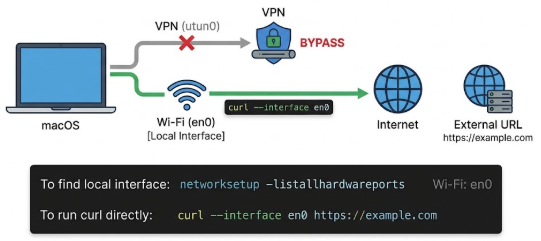
| To bypass your VPN and access an external URL directly using Here are the most effective ways to do this: Method 1: Specify the Network Interface in curl (Easiest)You can tell
STEP 1-1. Find your local network interface name:
STEP 1-2. Run
How to test/verify:To check if it's actually bypassing the VPN, check your IP address:
Method 2: Add a Temporary Static Route (If Method 1 fails)Some aggressive VPN configurations override interface binding. If Method 1 still routes traffic through the VPN, you can add a temporary route in macOS to send traffic for a specific IP address through your local gateway.
STEP 2-1. Find the IP address of the target URL: STEP 2-2. Find your local router's Gateway IP: Look for the IP address associated with your local interface (e.g.,
STEP 2-3. Add a static route for the target IP: Example:
STEP 2-4. Run your
STEP 2-5. Delete the route when finished (Optional):
Method 3: Bypass System Proxy (If VPN uses HTTP/HTTPS Proxy)If your VPN relies on macOS system proxies rather than a virtual network interface ( | ||
| | ||
| |