What Is CMAF? Guide to Common Media Application Format in Streaming
CK 3828 Created at
11700
What is CMAF?
CMAF stands for Common Media Application Format (officially standard ISO/IEC 23000-19). Developed by MPEG and published in 2018, CMAF is a standardized media format designed to simplify the encoding, storage, and delivery of over-the-top (OTT) video streaming.
Rather than being a new streaming protocol, CMAF is a standardized container format based on the Fragmented MP4 (fMP4) structure. It was created through a collaboration between major industry leaders—including Apple and Microsoft—to unify HTTP-based video streaming.
The Problem CMAF Solved
Before CMAF, the live and on-demand streaming landscape was fractured primarily between two dominant ecosystems:
Apple HLS (HTTP Live Streaming): Historically required media packaged in MPEG-2 Transport Stream (.ts) containers.
MPEG-DASH: Historically used Fragmented MP4 (.mp4 / .m4s) containers.
The Consequences of Ecosystem Fragmentation:
Duplicate Storage Costs: Publishers had to encode, store, and distribute the exact same video stream twice (once in .ts for Apple devices, once in .mp4 for Android, Web, Smart TVs, and Windows).
Inefficient CDN Caching: Content Delivery Networks (CDNs) had to cache two separate versions of the same file, reducing cache efficiency and increasing bandwidth costs.
High Latency: Traditional HLS and DASH delivery models suffered from a standard latency of 15 to 30 seconds behind live events.
Key Architectural Features of CMAF
CMAF brings standardization across several core components of video packaging:
1. Unified Container Structure (fMP4)
CMAF mandates the use of Fragmented MP4 (fMP4) files. Media files are broken down into independent, self-contained fragments (Header, Index, and Data fragments), allowing playback to begin as soon as the first fragment arrives.
2. Common Encryption (CENC)
CMAF supports Common Encryption, allowing media files to be encrypted once using Digital Rights Management (DRM) standards, while still remaining playable across different system DRM agents:
Apple FairPlay
Google Widevine
Microsoft PlayReady
(Note: Most modern CMAF implementations utilize CBCS mode encryption, which is natively supported across iOS, Android, and web platforms).
3. Media Profiles and Codecs
CMAF specifies exact standard profiles for modern video and audio codecs to ensure broad device compatibility:
Video: H.264 (AVC), H.265 (HEVC), AV1, VVC.
Audio: AAC, Dolby Digital Plus (E-AC-3), Opus.
Subtitles: IMSC1 (TTML) and WebVTT.
CMAF and Low-Latency Streaming (LL-CMAF)
One of CMAF’s most significant advancements is its support for Ultra-Low Latency Streaming (reducing broadcast delay down to 1–3 seconds, matching or beating traditional cable TV).
How Low Latency Works in CMAF:
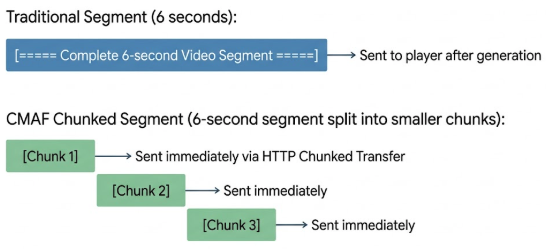
Chunked Encoding: A single CMAF media segment (e.g., 2–6 seconds long) is broken down internally into smaller units called Chunks (e.g., 200–500 milliseconds long).
HTTP Chunked Transfer Encoding: The encoder can publish, and the origin server can stream, individual chunks to the client while the rest of the parent segment is still being created.
Simultaneous Playback: The player begins decoding and displaying Chunk 1 without waiting for Chunk 2, 3, or the full 6-second segment to finalize.
CMAF vs. HLS and DASH
It is a common misconception that CMAF replaces HLS or DASH. In reality, CMAF works alongside them.
Component
Role
Examples
Media Container (CMAF)
Defines how audio, video, and text data are packaged into physical files.
.mp4, .m4s fragments
Streaming Protocol (HLS / DASH)
Defines the manifest files (playlists) that direct the client player on which media files to download.
.m3u8 (HLS), .mpd (DASH)
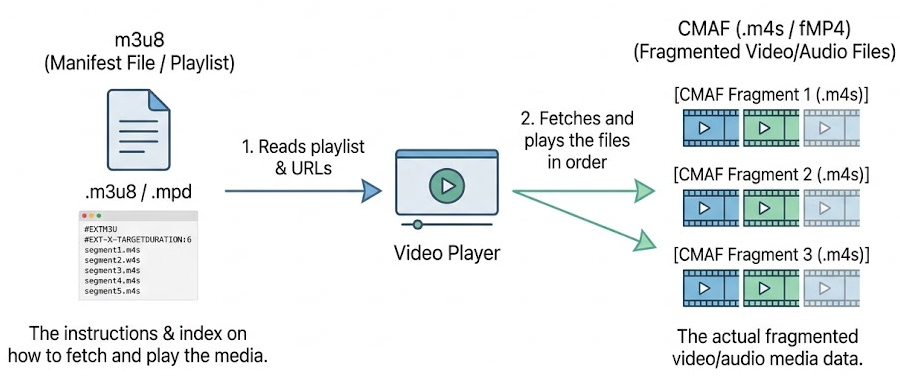
How They Work Together: A publisher creates one set of CMAF media files stored on the server. They then generate two lightweight manifest files pointing to those exact same media files:
An HLS Manifest (.m3u8) for Apple devices.
A DASH Manifest (.mpd) for Smart TVs, Android, and web platforms.
Key Benefits of CMAF
50% Reduction in Storage & Encoding Costs: Store only one copy of video files instead of duplicating formats for HLS (.ts) and DASH (.mp4).
Increased CDN Cache Efficiency: A single media object is cached at the edge server, significantly raising the cache hit ratio and decreasing server load.
Broadcast-Grade Latency: Enables real-time interactivity for sports betting, live auctions, gaming streams, and social media apps via LL-CMAF.
Legacy Device Compatibility: Very old legacy devices (e.g., older Smart TVs, older iOS devices) do not natively support fMP4 files via HLS and still require traditional MPEG-2 TS files.
Encryption Mode Mismatches: Historically, Apple favored CBCS mode encryption while Microsoft/Google used CTR (CENC) mode. While the industry has mostly converged on CBCS, legacy hardware may still require CTR.
[Stupid Question] So does that mean CMAF is a video file, or is it a manifest like m3u8?
CMAF (Common Media Application Format) is a video media file format, specifically based on the fMP4 (Fragmented MP4) container specification, and not a manifest like .m3u8 or .mpd.
Here is a breakdown of how they differ and work together:
1. CMAF (Common Media Application Format)
What it is: The actual media container format holding encoded audio, video, or subtitle data.
Format: It uses fragmented MP4 files (e.g., .m4s, .mp4).
Role: It standardizes how media segments are packaged so that a single set of video files can be played back across different ecosystems (Apple, Android, Web, Smart TVs) without duplicating storage into separate .ts or .mp4 formats.
2. m3u8 / MPD (Manifest Files)
What it is: A text-based playlist / instruction document (Manifest).
Role: It contains the metadata, URLs, index, and order of the media segment files so the video player knows which CMAF chunk/segment to request and play next.
HLS Manifest:.m3u8
DASH Manifest:.mpd
Key Summary
CMAF is the actual fragmented video/audio file, while m3u8 is the playlist/manifest file that directs the player on how to fetch and play those CMAF video files.