| A Canonical Redirect (often referenced alongside the Canonical Tag) is a technique used in search engine optimization (SEO) to solve duplicate content issues. When multiple URLs contain identical or substantially similar content, search engines get confused about which version to index and rank. Canonicalization guides search engines to the "master" or primary version of a webpage.
Canonical Tags vs. 301 RedirectsWhile often grouped together, canonical tags and 301 redirects serve distinct purposes: 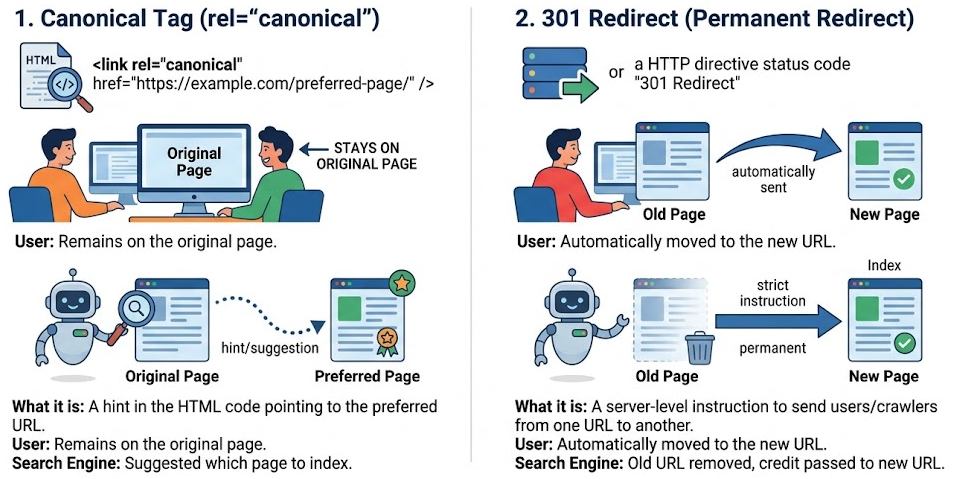
1. Canonical Tag (rel="canonical")- What it is: An HTML element placed in the section of a web page that points search engines to the preferred URL.
- User Experience: The user remains on the original page they visited; they are not automatically moved to a new URL.
- Search Engine Behavior: It acts as a hint or suggestion to search engine crawlers (like Googlebot) indicating which page should be indexed and assigned ranking signals.
- Code Example:
<link rel="canonical" href="https://example.com/preferred-page/" />
2. 301 Redirect (Permanent Redirect)- What it is: A server-level directive that automatically sends both users and search engine crawlers from one URL to another.
- User Experience: The browser immediately redirects the user to the new page.
- Search Engine Behavior: It acts as a strict instruction. Search engines remove the old URL from the index and pass almost all link equity to the new URL.
Common Causes of Duplicate ContentDuplicate content rarely happens intentionally. It usually stems from technical site architecture: - WWW vs. Non-WWW:
https://example.com vs. https://www.example.com - HTTP vs. HTTPS:
http://example.com vs. https://example.com - URL Parameters & Filters: E-commerce product sorting (e.g.,
example.com/shoes?color=red vs. example.com/shoes?sort=price) - Trailing Slashes:
example.com/page vs. example.com/page/ - Session IDs and Tracking Code: URLs appended with UTM parameters (e.g.,
?utm_source=newsletter) - Staging and Multi-region Sites: Mirrored pages across different domain extensions or test servers.
How Canonicalization Improves SEOImplementing canonical tags and canonical redirects provides several direct benefits to a website’s search engine performance: 1. Consolidates Link Equity (PageRank)When external websites link to different variations of the same page (e.g., some link to the www version, others to non-www), authority is fragmented. Canonicalization pools all backlink signals into a single, authoritative URL. 2. Prevents Duplicate Content Penalties/SuppressionSearch engines generally avoid displaying identical pages in search results. Without canonicalization, search engines might choose the wrong version of your page to display or dilute the rankings of all variations. 3. Preserves Crawl BudgetSearch engine bots have a limited amount of time ("crawl budget") to spend on your site. By preventing bots from repeatedly crawling identical pages, you ensure they spend time discovering and indexing new or updated content instead. 4. Directs Syndicated Content TrafficIf you publish content on third-party platforms (like Medium or news networks), adding a canonical tag pointing back to your original source ensures your primary website receives the SEO credit and traffic.
Best Practices for Implementing CanonicalizationTo ensure search engines respect your canonical choices, follow these guidelines: - Use Absolute URLs: Always specify the full URL path, including the protocol (e.g.,
https://example.com/page/ instead of /page/). - Implement Self-Referencing Canonical Tags: Every unique page should have a canonical tag pointing to itself. This prevents automated parameters from generating unintended duplicate content.
- Canonicalize Across Domains: Use cross-domain canonical tags if you republish content on multiple websites you control.
- Avoid Canonical Chains: Never point Page A to Page B, and then Page B to Page C. Always point directly to the final target URL.
- Do Not Block Canonicalized URLs in
robots.txt: If a search engine cannot crawl the canonicalized page due to a block, it cannot read the rel="canonical" tag. - Avoid Conflicting Signals: Do not canonicalize Page A to Page B, and then set a 301 redirect from Page B back to Page A.
Proven Strategies to Improve Overall SEO
While canonicalization fixes technical issues, a holistic SEO strategy requires action across multiple disciplines: 1. Technical SEO- Improve Page Load Speed: Optimize image sizes, leverage browser caching, minimize code (CSS/JS), and utilize Content Delivery Networks (CDNs).
- Ensure Mobile-Friendliness: Implement a responsive design, as Google uses mobile-first indexing.
- Secure the Site (HTTPS): Ensure SSL certificates are active across the entire domain.
- Maintain XML Sitemaps & Robots.txt: Ensure search engines can easily find and index your important pages without hitting dead ends.
2. On-Page SEO & Content Strategy- Target Intent-Driven Keywords: Conduct thorough keyword research to understand what users are searching for and create content that answers their specific queries.
- Optimize Metadata: Craft compelling Title Tags (50–60 characters) and Meta Descriptions (150–160 characters) that contain target keywords and encourage click-throughs.
- Use Proper Header Hierarchy: Organize content logically using single tags for main titles, followed by structured, and subheadings.
- Publish High-Quality, In-Depth Content: Focus on E-E-A-T (Experience, Expertise, Authoritativeness, and Trustworthiness). Content should be comprehensive, accurate, and original.
3. Off-Page SEO & Authority Building- Earn Quality Backlinks: Acquire links from reputable, industry-relevant websites through guest posting, digital PR, and creating link-worthy assets (infographics, original research, tools).
- Manage Local SEO: For businesses serving specific regions, create and optimize a Google Business Profile, collect positive customer reviews, and ensure consistent NAP (Name, Address, Phone) citations.
4. User Experience (UX) & Core Web Vitals- Optimize Core Web Vitals: Focus on metrics measured by Google:
- LCP (Largest Contentful Paint): Loading speed.
- FID/INP (Interaction to Next Paint): Responsiveness.
- CLS (Cumulative Layout Shift): Visual stability.
- Reduce Bounce Rates: Keep navigation intuitive, improve readability with white space and short paragraphs, and clear away intrusive pop-ups.
|