How do I input switch Korean to Chinese on Mac?

CK CK 3788 
Created at  
919 0 0

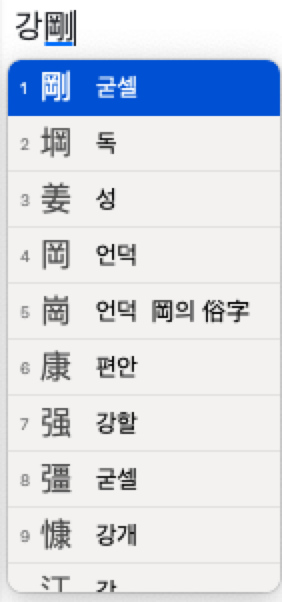
It's easy, just click [right alt/option] + [enter] - you will see Chinese converted.


Before you convert it to Chinese, you should have the Korean letter like below:

How do I input switch Korean to Chinese on Mac?

As you can see above, the cursor should be beside of the letter.

And you will see below when you click [right alt/option] + [enter]:

How do I input switch Korean to Chinese on Mac?

Tags Conversion to Chinese Korean to Chinese Mac Mac에서 한자 보기 Switch to Chinese 한자 한자변환 Facebook X

Comments 0
Similar posts
  1. Installing MongoDB on a Mac with Homebrew
    1,244
  1. Is a Used M1 or M2 MacBook Pro a Smart Buy Over M4?
    290
  2. Controlling Two Macs with One Keyboard — It Really Feels Like Magic
    1,199
Recently updated
  1. Why 100% SEO Guarantees Better User Engagement and How to Achieve It in Your Service
    42
  2. Why SPF and DKIM Are Essential for Linux Email Servers?
    36
  3. How do I create animated background for Google Meet?
    21,008
  4. MaxMind GeoLite2 vs. DB-IP Lite vs. ip-api.com: Choosing the Right Free IP Geolocation Solution
    251
  5. Meet Valkey: Why Redis Changed Its License, Why Valkey is Better, and How to Use It as a Drop-in Replacement
    94
  6. How Rogue Web Scrapers Are Stealing My Content and Destroying My Server
    157
  7. Array of arguments passed to script in PHP
    90
  8. Invalid Auction Storms in Ad Tech
    98
  9. Building MRC-Compliant Instrumentation in Ad Tech: Implementation Steps and Key Challenges
    202
  10. The Two Clocks of Ad Server Architecture
    70
  11. Frequency Cap Architecture Overview
    515
  12. Collecting Proof-of-Play from 100,000 Screens
    146
  13. Vector Search in Relational Databases (RDBs): Trends & Usage Environments
    288
  14. What is RedisVL?
    109
  15. Designing a Skill Registry Architecture: Minimize Token Usage and Maximize AI Performance
    232
  16. TPU & GPU Cluster Management Tools
    245
  17. The Concept of Scaffolding in AI Agents
    234
  18. Beyond Static Pipelines: Architecting LLM Multi-Agent Systems for Autonomous Workflow Orchestration
    583
  19. AI-DLC vs. AI-SDLC: Model-Centric vs. System-Centric AI Development
    259
  20. Fine-Tuning Open-Weight LLMs: Training, Licensing, and Deploying Custom Models with Ollama
    339
  21. Inside the Next-Generation Streaming Architecture: Ultra-Low Latency, SGAI, and AI Codecs
    202
  22. Machine Learning: Training vs. Ranking
    222
  23. The Continuous Learning Machine: Designing a Loop That Actually Turns
    222
  24. The Next-Gen Low-Latency Standards: LL-HLS & MoQ
    195
  25. Designing a Data Curation System Around a Vector Database
    221
  26. Extracting Context from Live Video: The Architecture Got Simpler When We Stopped Building Features
    256
  27. The New Ad Stack Behind Live Sports Streaming: Inside SGAI, EABN, and the Standards Race to Fix Live Monetization
    656
  28. Designing MLOps Architectures to Handle Seasonal Data Drift in EV Fleet Models
    196
  29. From 15 to 40+ FPS: Accelerating PyTorch Object Detection on Automotive ECUs
    219
  30. Understanding Data Lineage
    262